



AI Color Analysis: How to Find Your Best Colors With AI
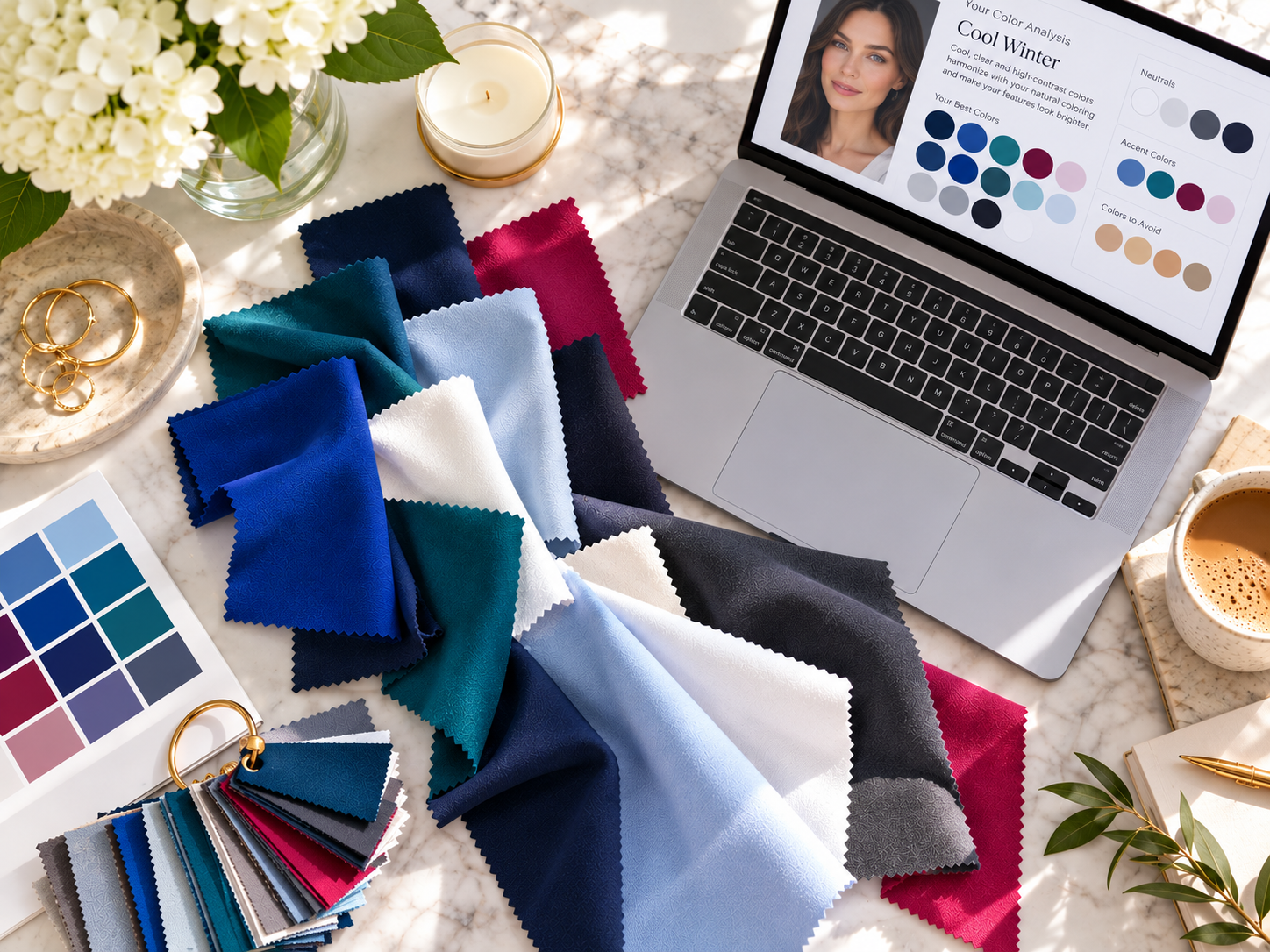
AI color analysis can help you figure out which clothing colors, makeup shades and neutrals work best with your natural coloring, without booking an in-person seasonal color consultation.
The catch is that the answer is only as good as the evidence you give it. One selfie in warm bathroom lighting will get you a confident, specific and possibly wrong result.
I learned that the first time I tried it. The AI looked at my blue-gray eyes, brown hair and fairly neutral coloring and called me a Soft Summer.
It was a reasonable read, and plenty of muted blues and greens do look good on me. But years ago, an in-person color analysis had placed me as a Cool Winter, and that memory made me want to push back rather than accept the first answer.
So I kept testing. I uploaded more photos, including shots of myself in bright blue, deep teal, navy, red, pink, gray and black, and compared the colors I reach for constantly with the ones I rarely wear.
With more to work from, the analysis shifted to Cool Winter, which matched both my history and my closet far better. That back-and-forth is the real method, and it’s the one I’d recommend if you want to try an AI color analysis from your own photos.
What Is an AI Color Analysis?
Personal color analysis looks at the traits that control how color interacts with your face: skin undertone, natural hair color, eye color, the contrast between those features, your overall depth (how light or dark you read) and chroma (whether you look best in clear, saturated color or softer, muted color).
Those traits place you in one of four seasonal families. Most modern systems split each family into three subseasons, for 12 in total.
| Season | Defining traits | Subseasons |
|---|---|---|
| Spring | Warm, clear, light to medium | Light Spring, Warm (True) Spring, Bright Spring |
| Summer | Cool, soft, light to medium | Light Summer, Cool (True) Summer, Soft Summer |
| Autumn | Warm, muted, medium to deep | Soft Autumn, Warm (True) Autumn, Deep Autumn |
| Winter | Cool, clear, high contrast | Deep Winter, Cool (True) Winter, Bright Winter |
An AI color analysis does the same job with photos instead of the fabric drapes a professional holds under your chin.
It reads your features, estimates where you fall among the 12 seasons and translates that into recommendations for clothing, makeup, jewelry and even hair color.
If you want the framework that started it all, Carole Jackson’s Color Me Beautiful popularized seasonal color analysis in the 1980s; it uses four seasons rather than twelve, but the logic of undertone and contrast is the same.
The key word is estimates. Lighting, camera processing, makeup, hair dye, a recent tan and even the paint color behind you all change how you appear in a photo.
A single selfie gives the AI one distorted data point and asks it to be certain, which is why the method below relies on multiple photos and direct comparisons.
How to Do an AI Color Analysis From Your Photos
You don’t need a professional photo shoot, but you do need several useful photos and a better question than “What season am I?” These four steps are what turned my analysis from a plausible guess into an answer I trust.
Step 1: Start With a Neutral Photo
Your first photo sets the baseline, so take it facing a window in indirect daylight, with minimal or no makeup and no filters.
Frame your face, neck and upper chest, let your natural hair show if you can, and wear a neutral shirt that doesn’t throw color onto your skin.
Skip golden-hour sun and bathroom vanity lighting for this one, since both make almost anyone look warmer than they are.
If you’re testing in the darker months or your home doesn’t get good daylight, a daylight-balanced light like the NEEWER 18-inch ring light, set to 5600K, gives every comparison photo the same neutral light.
Step 2: Upload More Than One Photo
This is where my analysis improved the most. My early photos made a muted Summer palette look plausible.
Once I added pictures of myself in clear red, cobalt, navy, teal, emerald and brighter pink, it was obvious that strong color didn’t overwhelm me.
In many cases it made my features look clearer, which is a key sign that you can handle more saturation and contrast than a Soft Summer typically can.
Aim for photos in several color families: black, white, navy, charcoal, bright blue, muted blue, green, pink, red, purple and beige or brown. You aren’t asking the AI which shirt it likes best. You’re giving it enough data to spot a pattern.
Step 3: Use Clothes You Already Own as Digital Drapes
Professional analysts hold fabric drapes around your face and watch what happens to your skin. You can build a rough digital version with your own closet by taking photos in the same lighting while wearing contrasting pairs.
- To separate Summer from Winter: charcoal vs. true black, soft white vs. optic white, dusty blue vs. cobalt, dusty rose vs. fuchsia, muted teal vs. emerald
- To separate warm from cool: camel vs. cool gray, rust vs. berry, olive vs. blue-green, coral vs. raspberry, cream vs. crisp white
If your closet leans heavily toward one color family, an at-home kit like the Get Snappin Seasonal Color Analysis Draping Kit gives you 28 fabric drapes, to photograph under your face in identical light.
Once you have the pairs, ask the AI to compare them directly:
Compare these photos specifically. Which colors make my complexion appear clearer and more even? Which make my eyes more noticeable? Which colors appear to wear me instead of supporting me?
Step 4: Use a Detailed AI Color Analysis Prompt
A vague question gets a vague answer. This prompt asks the AI to show its work, which makes the result far easier to evaluate. Copy and paste it after uploading your photos:
Analyze my coloring for seasonal color analysis using the photos I’ve uploaded. Look at my apparent undertone, natural hair color, eye color, depth, contrast and chroma.
Do not choose a season based on one photo alone. Compare how my coloring responds to both muted and saturated colors, light and dark colors, and warm and cool colors across the images.
Tell me the most likely seasonal family and the closest neighboring seasons. Explain what evidence supports each possibility and what additional clothing colors would help distinguish between them.
Then give me recommendations for clothing colors, neutrals, makeup shades, jewelry metals and colors to use more cautiously.
The most important line is the request for neighboring seasons. When the evidence is mixed, you want the AI to tell you so instead of forcing a confident single answer.
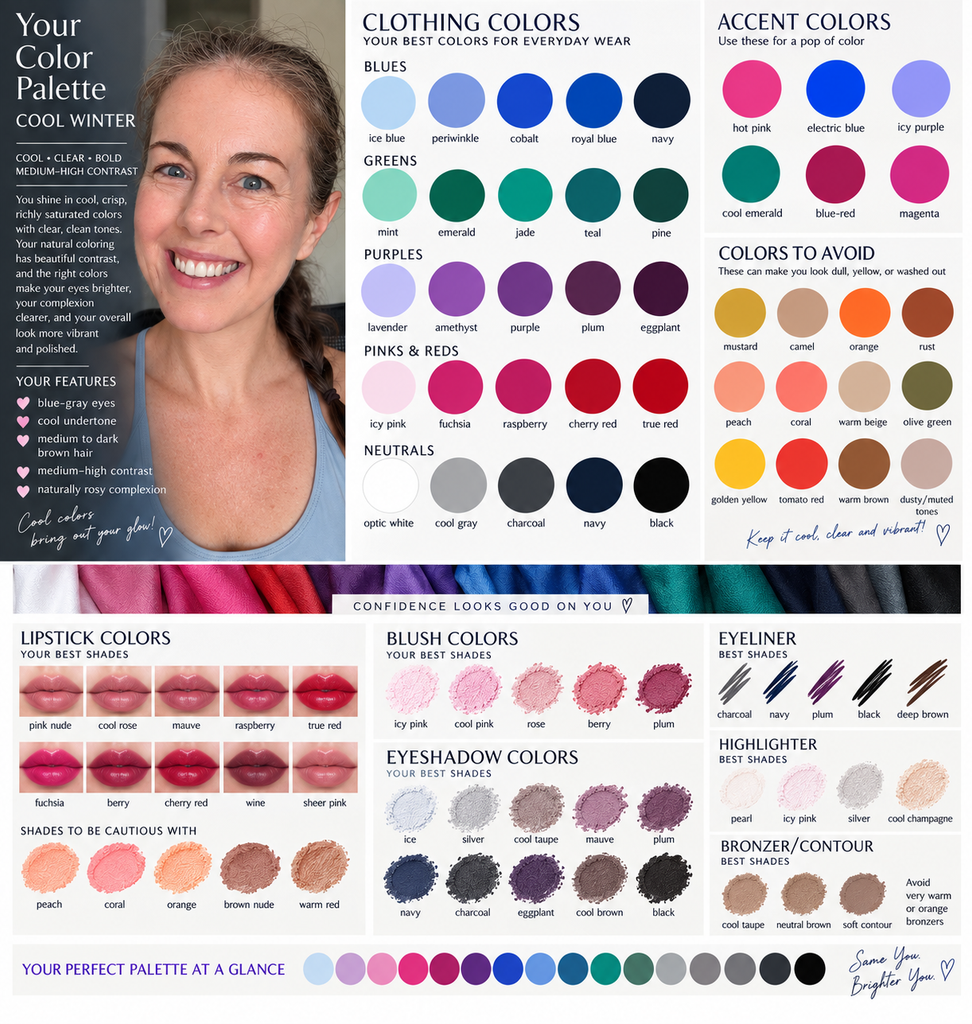
The result will look something like this:
Can You Do an AI Color Analysis With the Free Version of ChatGPT?
Yes. You don’t need a dedicated color analysis app or a paid subscription to try this method.
General AI assistants like ChatGPT, Gemini and Claude can all read uploaded photos, and their free plans are enough to run the prompt above.
The main limit is volume: free tiers cap how many images and messages you can send in a day, so batch your photos and spread the comparison across a couple of sessions if you hit the ceiling.
Dedicated color analysis apps and websites work too, and many offer a free first result. Most rely on a single photo and return a single season, though, which skips the part that made my analysis accurate.
A free AI color analysis in a general chat tool lets you keep the conversation going, add photos, and push back when the answer doesn’t fit.
Don’t Stop at the First Result
My first result was Soft Summer, and the reasoning wasn’t bad. Muted blue looked good on me, my natural hair isn’t especially dark, my eyes are blue-gray and my overall coloring isn’t stark.
If I’d stopped there, I would have built a palette around dusty blues and soft mauves and wondered why my favorite navy pieces suddenly felt off-limits.
What didn’t fit was my own history. I’ve looked good in black, navy, red and royal blue for years, so I challenged the answer.
Asking the AI to simply “try again” tends to produce a different guess from the same evidence. Asking it to compare four specific candidates (Soft Summer, Cool Summer, Cool Winter and Deep Winter) forces it to weigh what supports and contradicts each one instead of defending its first pick.
A follow-up like this works well:
You suggested Soft Summer, but I consistently look good in black, navy, true red and royal blue. Compare Soft Summer, Cool Summer, Cool Winter and Deep Winter using all of my photos. What evidence supports or contradicts each one?
How I Ended Up as a Cool Winter
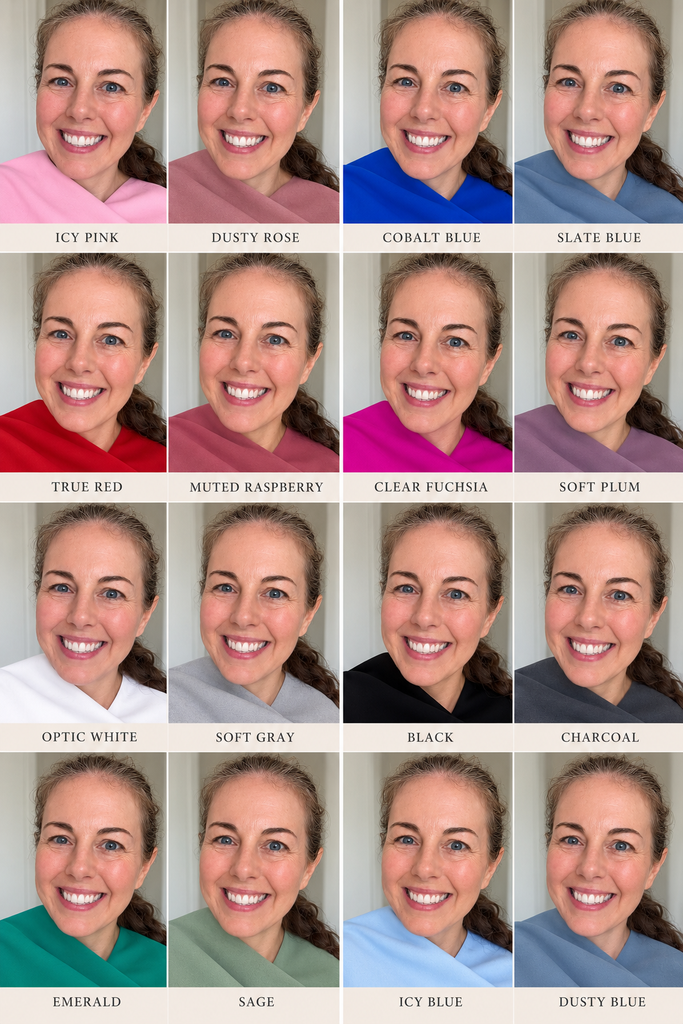
Once the AI had enough photos to compare, the pattern was hard to miss.
My strongest colors were cobalt, royal blue, deep teal, cool green, navy, raspberry, berry, crisp white and a bright cool pink. I could also wear black without it overwhelming my coloring, which is usually the first thing that goes wrong for a true Summer.
The softer Summer colors didn’t suddenly become wrong, either. Blue-gray, muted teal and some mauves still looked good; they just weren’t my best.
That led to a more useful conclusion than a single label: Cool Winter, with the ability to borrow from Cool Summer.
That distinction matters in real life. A textbook Cool Winter wardrobe leans hard on black and icy jewel tones, which isn’t how I dress.
Knowing I can borrow from the neighboring season let me keep the parts of Cool Winter that fit my life: navy, denim, charcoal, white, cobalt, periwinkle, deep teal, emerald, berry and cool pink.
It’s a far more wearable palette, and it still does the job of making my coloring look clear and even.
What If You Look Good in a Color That Isn’t in Your Season?
Brown was the color I questioned most. I’ve always felt good in it, and Cool Winter palettes rarely feature it. The answer turned out to be that “brown” covers dozens of undertones.
A Cool Winter may struggle with warm browns like camel, caramel, cognac, cinnamon and orange-brown, while cool, deep browns like espresso, cool chocolate, cocoa, mushroom and cool taupe can look perfectly good.
That’s the most useful way to read any seasonal palette.
Color analysis shouldn’t turn your closet into a list of prohibited colors. It’s a guide to which version of a color works best on you, so the question isn’t whether you can wear green but whether your green is olive, sage, emerald or teal.
Turn Your Results Into a Visual Color Palette
Once you’ve narrowed down your season, ask the AI to turn the analysis into a visual palette you can pull up while shopping. I asked for one that covered:
- clothing colors, neutrals and accent colors
- colors to avoid or use sparingly
- lipstick, blush, eyeshadow, eyeliner and bronzer shades
- jewelry metals
Ask for a hex code under each swatch, too. It makes matching a product photo online much easier than trying to remember what “cool berry” looked like.
Makeup is where a palette pays off fastest, because it’s a smaller and cheaper decision than a new wardrobe. Winters typically do well with blue-based reds, and MAC Ruby Woo is the classic example of that cool, clear red.
Cool seasons also tend to favor silver, white gold and platinum over yellow gold, so a simple pair of sterling silver huggie earrings is an easy way to test a cool metal near your face.
This is also where AI goes beyond a traditional consultation. A color analyst can tell you you’re a Cool Winter. AI can help with the next question: what does a Cool Winter wardrobe look like for someone who doesn’t want half the pieces in a traditional capsule wardrobe?
Color Is Only One Part of Building a Wardrobe
After building my palette, I asked AI for a capsule wardrobe, and the first attempts missed badly.
The colors were right, but the clothes weren’t: blazers I’d never wear, dated wrap dresses, cardigans, generic striped shirts and overly corporate pieces that made no sense for my body or my days. AI knew my colors. It didn’t know me yet.
The fix was more context. I described my shape (pear-shaped, with an athletic build from years of barre3 and strength training, a slightly shorter torso, a small-to-medium chest and fuller hips and thighs) and my preferences: fitted, flattering silhouettes, clothes that are comfortable but structured, elevated athleisure, clean sport minimalism and workwear that looks polished without looking corporate.
From there, we landed on a style description that finally felt right: modern country club minimalist, without the prissiness.
Think clean athletic lines and polished everyday pieces, like CRZ Yoga Butterluxe flare leggings in navy or a cobalt layer from Athleta, rather than tennis-skirt cosplay or head-to-toe beige “old money” outfits.
Turning that description into an actual closet is its own process, and I walk through it step by step in How to Build a Capsule Wardrobe You’ll Actually Wear With AI.
Tips for a More Accurate AI Color Analysis
If you’re trying this yourself, these are the things I’d do from the beginning:
- Upload multiple photos. A single photo can make almost anyone look like two or three different seasons.
- Include at least one neutral daylight photo. Add others in different lighting so the AI can see which traits stay consistent.
- Show yourself wearing real colors. Your photo history is evidence, and the clothes you already own are free drapes.
- Ask the AI to compare neighboring seasons. A ranked shortlist with reasoning is more useful than one confident label.
- Challenge results that contradict your experience. Give the AI the specific counterexample, not just “try again.”
- Test specific colors instead of debating labels. Cobalt vs. dusty blue tells you more than Winter vs. Summer in the abstract.
- Treat the result as a guide, not a rulebook. The goal is the best version of each color, not a banned list.
- Save your final palette where you’ll see it. A visual reference with hex codes is what makes the analysis useful while shopping.
Can AI Replace a Professional Color Analysis?
Not completely. A trained color analyst drapes physical fabric against your skin under controlled lighting, which removes most of the variables that distort photos.
AI is working from imperfect visual information and can’t watch your face change in real time as one drape replaces another.
But if you’re curious about seasonal color analysis, want a solid starting point or aren’t ready to pay for a professional consultation, AI can be surprisingly helpful, especially when you treat it as an iterative process rather than a one-click answer.
That was the difference for me. The first answer wasn’t especially useful, but the conversation that followed was. And if you do book a professional later, you’ll walk in with a working hypothesis and a set of photos to test it against.
The Bottom Line
An AI color analysis can do much more than tell you whether you’re a Spring, Summer, Autumn or Winter.
Used well, it can explain why certain colors keep working for you, identify the best versions of the colors you already love and give you a visual palette that makes shopping and getting dressed considerably easier.
Just don’t upload one selfie and let the robot reorganize your entire closet. Give it evidence, challenge the answer and make it prove its case.
The goal isn’t to fit yourself into a color season. It’s to build a wardrobe that makes you look better.



Get the Weekly Wellth Newsletter
Stay up to date & receive the latest posts in your inbox.